What this GPU cost calculator does
Renting GPUs in the cloud is billed by the hour per instance, and an instance can hold one GPU or eight. That makes it hard to compare offers or to turn a training plan into a budget. This GPU cost calculator does the arithmetic. Pick an instance from the list (or enter your own hourly price and GPU count), say how many instances you need, for how many hours a day and for how many days, and it shows:
- Total cost for the period, in US dollars.
- Instance-hours: instances × hours a day × days.
- GPU hours: instance-hours × GPUs per instance.
- Price per GPU per hour: the instance price divided by its GPU count, the fairest way to compare an 8-GPU machine with a 1-GPU one.
- Cost of a 30-day month at the same number of instances and hours a day.
Prices are on-demand list prices for Linux instances in US East regions, as published by AWS and Microsoft Azure. They are the starting point before any discount, and they exclude storage, data transfer, networking and taxes.
How to use the GPU cost calculator
You need the instance you plan to use, or its hourly price and GPU count, and a rough schedule.
- Pick an instance. Choose an AWS or Azure GPU instance from the list, or choose custom and enter a price per hour and the number of GPUs.
- Enter the number of instances. Type how many instances run at the same time.
- Enter hours a day and days. Enter how many hours a day they run and for how many days. Use 24 for always-on servers.
- Read the results. The tool shows total cost, instance-hours, GPU hours, price per GPU per hour and the cost of a 30-day month at the same daily use.
- Check the real price. Prices are on-demand list prices for Linux in US East. Add storage, data transfer and taxes, and enter a custom price for spot or committed rates.
How the cost is calculated
The maths is the same for every cloud:
- Instance-hours = instances × hours a day × days
- Total cost = price per instance-hour × instance-hours
- GPU hours = instance-hours × GPUs per instance
- Price per GPU per hour = price per instance-hour ÷ GPUs per instance
- Monthly cost = price per instance-hour × instances × hours a day × 30
Worked example: one AWS p5.48xlarge for a month
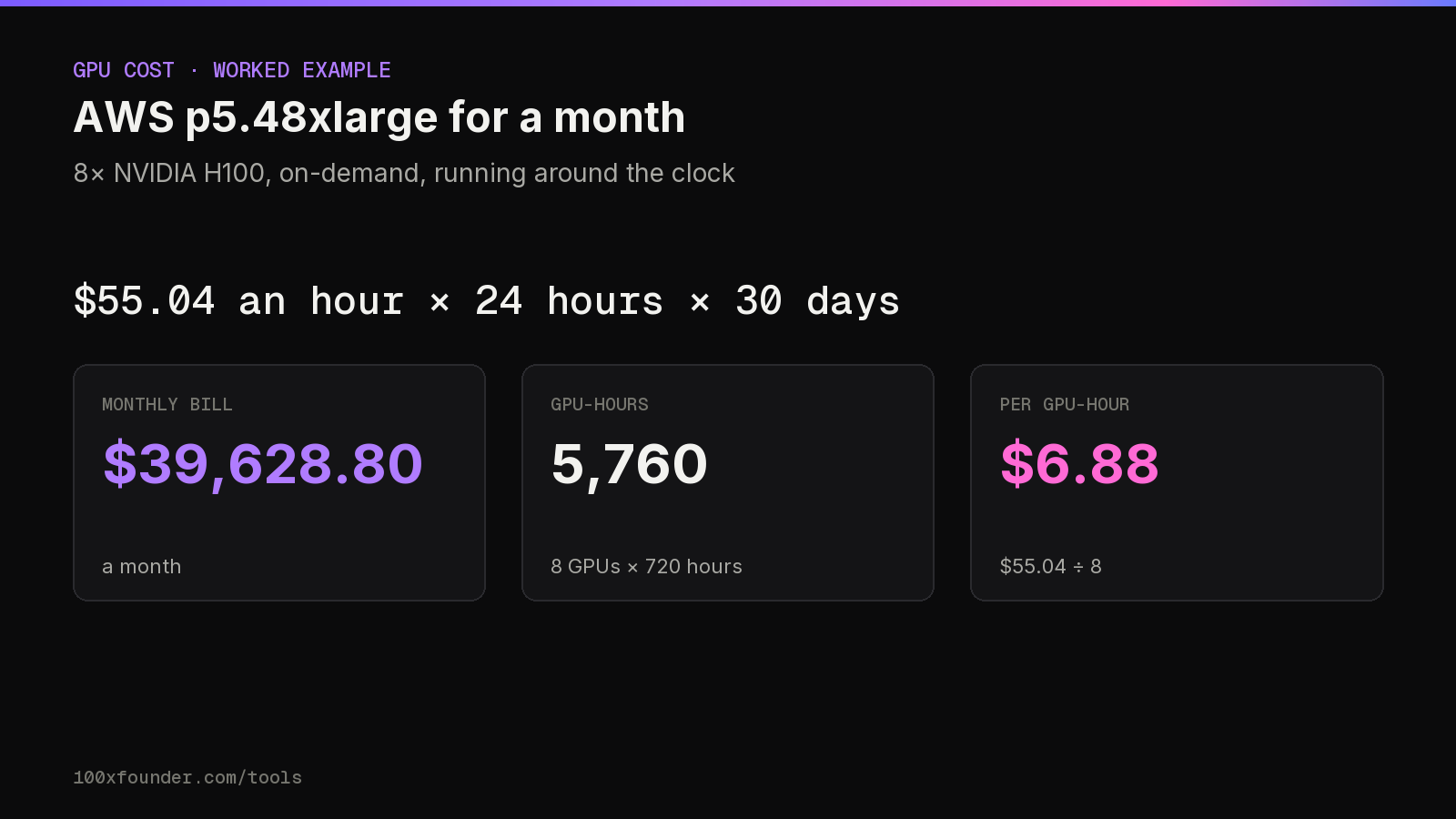
An AWS p5.48xlarge has 8 NVIDIA H100 GPUs with 80 GiB of memory each, according to AWS's instance specifications. At the on-demand list price of $55.04 an hour, running one instance around the clock for 30 days:
| Line | Working | Result |
|---|---|---|
| Instance-hours | 1 × 24 × 30 | 720 |
| Total cost | $55.04 × 720 | $39,628.80 |
| GPU hours | 720 × 8 | 5,760 |
| Price per GPU per hour | $55.04 ÷ 8 | $6.88 |
The single-GPU p5.4xlarge (1 H100, 80 GiB) lists at $6.88 an hour, the same per-GPU rate. Used for 8 hours a day on 22 working days it comes to $1,210.88 for 176 GPU hours; a full 30 days at 8 hours a day would be $1,651.20.
GPU pricing by instance: AWS and Azure
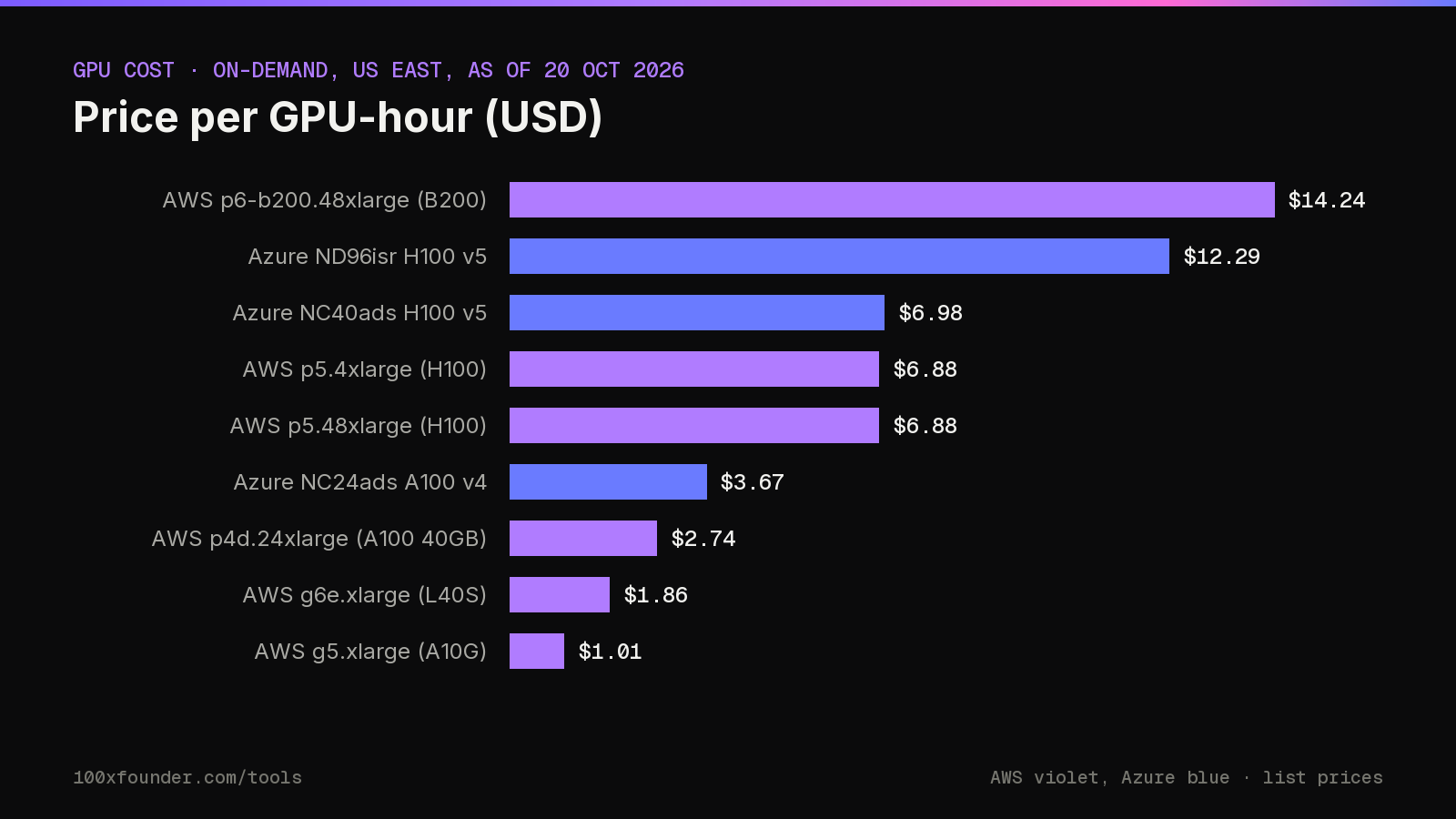
These are the instances the calculator lists, with prices as of 20 October 2026 from the AWS EC2 on-demand pricing page and the Azure Linux virtual machine pricing page. Prices change and differ by region, so check the provider's page before you commit.
| Cloud | Instance | GPUs | Per hour | Per GPU-hour |
|---|---|---|---|---|
| AWS | p6-b200.48xlarge | 8 × NVIDIA B200 | $113.93 | $14.24 |
| AWS | p5.48xlarge | 8 × NVIDIA H100 | $55.04 | $6.88 |
| AWS | p5.4xlarge | 1 × NVIDIA H100 | $6.88 | $6.88 |
| AWS | p4d.24xlarge | 8 × NVIDIA A100 40GB | $21.96 | $2.74 |
| AWS | g6e.xlarge | 1 × NVIDIA L40S | $1.86 | $1.86 |
| AWS | g5.xlarge | 1 × NVIDIA A10G | $1.01 | $1.01 |
| Azure | ND96isr H100 v5 | 8 × NVIDIA H100 | $98.32 | $12.29 |
| Azure | NC40ads H100 v5 | 1 × NVIDIA H100 | $6.98 | $6.98 |
| Azure | NC24ads A100 v4 | 1 × NVIDIA A100 80GB | $3.67 | $3.67 |
US dollars, on-demand Linux list prices in US East. Prices as of 20 October 2026 from the AWS and Azure pricing pages.
GPU counts and memory come from each provider's instance documentation:
- AWS: p6-b200.48xlarge has 8 NVIDIA B200 GPUs (179 GiB each); p5.48xlarge has 8 H100 (80 GiB each); p5.4xlarge has 1 H100; p4d.24xlarge has 8 A100 with 40 GiB each; g6e.xlarge has 1 L40S (44 GiB); g5.xlarge has 1 A10G (22 GiB).
- Azure: Standard_ND96isr_H100_v5 has 8 H100 GPUs (80 GB each, 640 GB in total); Standard_NC40ads_H100_v5 has 1 H100 NVL with 94 GB; Standard_NC24ads_A100_v4 has 1 A100 with 80 GB.
Google Cloud isn't in the list yet because we haven't checked a Google Cloud list price for these GPUs against its official page. You can still use the tool for Google Cloud, or any GPU cloud, by entering a custom price per hour and GPU count.
H100 price per hour on AWS and Azure
The most searched question is what one H100 costs per hour. Dividing each instance's list price by its GPU count, at on-demand prices as of 20 October 2026:
| Instance | GPUs | Per instance-hour | Per GPU per hour |
|---|---|---|---|
| AWS p5.48xlarge | 8 × H100 | $55.04 | $6.88 |
| AWS p5.4xlarge | 1 × H100 | $6.88 | $6.88 |
| Azure NC40ads H100 v5 | 1 × H100 NVL | $6.98 | $6.98 |
| Azure ND96isr H100 v5 | 8 × H100 | $98.32 | $12.29 |
The 8-GPU machines are not just eight single GPUs in a box. They add fast GPU-to-GPU links and high-bandwidth networking for training across many machines: Microsoft's documentation describes a dedicated 400 Gbps InfiniBand connection per GPU on ND H100 v5. If your job fits on one GPU, the single-GPU instance is usually the cheaper way in; if it needs eight working together, compare the 8-GPU instances.
GPU cloud cost comparison: AWS vs Azure
Using it as an AWS GPU cost calculator
For AWS, the list covers the B200, H100, A100, L40S and A10G families. Two AWS instances at the small end, g5.xlarge at $1.006 an hour and g6e.xlarge at $1.861 are the low-cost end of the list, each with a single GPU. Running two g5.xlarge around the clock for 30 days comes to $1,448.64.
Using it as an Azure GPU cost calculator
For Azure, the list covers the ND H100 v5, NCads H100 v5 and NC A100 v4 series. One ND96isr H100 v5 for a 30-day month at 24 hours a day lists at $70,790.40, compared with $39,628.80 for AWS's 8-GPU p5.48xlarge. A single NC40ads H100 v5 for the same month is $5,025.60.
A list-price comparison is only a first filter. Before you choose a cloud, check which regions have capacity for the GPU you want, what quota you can get, the cost of storage and data transfer for your datasets, and the discounts you qualify for. Credits from startup programmes can also change the answer for an early company; our funding tracker and news cover the AI startups raising money to pay for exactly this.
Estimating a training or fine-tuning run
For a one-off job, the question is how many GPU hours it needs, not how many days the calendar says. A practical way to get that number:
- Run a short slice of the job, for example a few hundred steps, on the GPU you plan to use.
- Time it and scale up to the full job: if 2% of the steps took 48 minutes, the whole run needs about 40 hours on that GPU.
- Add a margin for evaluation runs, restarts and the experiments that don't work.
- Enter the result in the GPU cost calculator as hours a day and days.
Take that 40-hour job on one H100. On a p5.4xlarge at $6.88 an hour it costs $275.20. If the same job split perfectly across the eight H100s of a p5.48xlarge, it would finish in 5 hours for the same $275.20: the same 40 GPU hours, delivered faster. In practice jobs don't always split perfectly across eight GPUs, so measure the multi-GPU run too before you budget on it. That is also why the price per GPU per hour matters more than the instance price: it tells you what each unit of work costs.
A slower, cheaper GPU is not automatically cheaper per job. An A100 on the p4d.24xlarge lists at about $2.74 per GPU per hour against $6.88 for an H100, but if your job runs several times faster on the H100, the H100 can still cost less in total. Time the job on both before choosing; the GPU cost calculator then gives the bill for each.
Always-on inference: monthly GPU cost
Serving a model to users is different from training. The GPU runs whether or not anyone is asking questions, so the monthly bill is set by hours, not by work done. One instance, 24 hours a day for 30 days, at on-demand list prices:
| Instance | GPU | 30 days, 24/7 |
|---|---|---|
| AWS g5.xlarge | 1 × A10G (22 GiB) | $724.32 |
| AWS g6e.xlarge | 1 × L40S (44 GiB) | $1,339.92 |
| Azure NC24ads A100 v4 | 1 × A100 (80 GB) | $2,644.56 |
| AWS p5.4xlarge | 1 × H100 (80 GiB) | $4,953.60 |
The model has to fit in GPU memory, so memory, not price, usually decides the smallest instance you can use. If traffic is low or comes in bursts, a pay-per-token API may cost less than a GPU that sits idle most of the day. Budgeting in rupees? The prices here are in US dollars; convert at the rate your card or bank actually charges.
Building a GPU budget for a startup
For an early AI company, compute is often the biggest bill after salaries, and it is easy to underestimate. A GPU budget is more reliable when it is built from separate lines rather than one guess:
- Experiments. Short runs to test ideas. Usually single GPUs, often interrupted, a good fit for spot capacity.
- Main training or fine-tuning runs. Estimate each from a timed slice, as above, and add a margin for reruns.
- Evaluation. Running test sets after every change adds up, especially for large models.
- Serving. The always-on instances that answer users, plus spare capacity for peaks.
- Everything around the GPUs. Storage for datasets and checkpoints, data transfer, monitoring and the engineers' own development machines.
Run each line through the GPU cost calculator separately, add them up, and then compare the total with what a hosted model API would cost for the same product. Many teams start on APIs and move to their own GPUs only when volume makes it cheaper; the token cost calculator gives the other side of that comparison. Revisit the budget each month, because both GPU and API prices move.
Keep the assumptions written next to the numbers: the instance, region, price date and hours. When the bill arrives, you can see which assumption was wrong instead of arguing about the total.
Paying less than list price
On-demand prices are the most flexible and the most expensive. The main alternatives, as the providers describe them:
- Spot capacity. AWS says Spot Instances can save up to 90% on on-demand prices, and Azure says the same of its Spot VMs, but the provider can reclaim the machine when it needs capacity (Azure gives a 30-second warning to subscribers of its scheduled events). Good for jobs that checkpoint and restart.
- Commitments. AWS lists savings of up to 72% with EC2 Instance Savings Plans and up to 66% with Compute Savings Plans, in return for a one- or three-year spending commitment.
- Reserved blocks for training. AWS's EC2 Capacity Blocks for ML let you book GPU instances such as P5 and P6-B200 up to eight weeks ahead, for up to six months, in clusters of 1 to 64 instances.
To estimate a discounted plan, enter the discounted hourly price as a custom price. The GPU cost calculator then works the same way.
Tips and common mistakes
Tips
- Compare on price per GPU per hour, then check memory: an 80 GB H100 and a 40 GB A100 are not interchangeable for large models.
- Measure how long a job really takes on one GPU before you multiply it out; the newer GPU can be cheaper per job even at a higher hourly price.
- Switch instances off when idle. Hours a day is the input that saves the most money.
- Re-run the GPU cost calculator when list prices change or a new instance type appears, and note the price date next to every estimate you share with your team or investors.
- If you call a hosted model instead of running your own, compare with the token cost calculator; for many workloads an API is cheaper than an idle GPU.
Common mistakes
- Comparing per-instance prices between machines with different GPU counts.
- Forgetting storage and data transfer, which are billed separately.
- Using another region's price. The list here is US East; other regions differ.
- Assuming capacity is available. High-end GPUs often need quota approval or reservations.
- Leaving out taxes that apply where you are billed.
FAQ
What is the H100 price per hour on AWS?
At on-demand list prices as of 20 October 2026 in US East, both the 8-GPU p5.48xlarge ($55.04 an hour) and the single-GPU p5.4xlarge ($6.88 an hour) work out to $6.88 per H100 per hour. Spot and committed prices are lower.
Is there an AWS GPU cost calculator for spot prices?
Spot prices change with demand, so the list uses on-demand prices. Enter the current spot price from the AWS console as a custom price to get a spot estimate.
Can I use it as an Azure GPU cost calculator?
Yes. It lists the ND96isr H100 v5, NC40ads H100 v5 and NC24ads A100 v4 at Azure's Linux pay-as-you-go prices for US East. For other sizes or regions, enter a custom price.
Why isn't Google Cloud listed?
We only list prices we have checked on the provider's official page, and we haven't done that for Google Cloud yet. You can enter a Google Cloud price per hour and GPU count as a custom instance.
What is a GPU hour?
One GPU running for one hour. An 8-GPU instance running for one hour uses eight GPU hours, which is why price per GPU per hour is the fair comparison.
How do I estimate GPU hours for a training job?
Time a short slice of the job on the GPU you plan to use, scale it to the full run and add a margin for restarts and experiments. Multiply by the number of GPUs if the job runs on several at once.
Does the price include storage and data transfer?
No. The list prices cover the instance only. Disks, snapshots, data transfer and taxes are billed separately.
Is renting cheaper than buying GPUs?
It depends on how many hours a year you would use them, power and hosting costs, and how quickly the hardware is replaced. The calculator shows the rental side; compare it with a quote for owned hardware over the same period.
Sources
- Amazon Web Services, “Amazon EC2 On-Demand Pricing”, 2026-10-20
- Microsoft Azure, “Linux Virtual Machines Pricing”, 2026-10-20
- Amazon Web Services, “Specifications for Amazon EC2 accelerated computing instances”, 2026
- Microsoft Learn, “ND-H100-v5 size series”, 2026-09-25
- Microsoft Learn, “NCads_H100_v5 size series”, 2026
- Microsoft Learn, “NC_A100_v4 size series”, 2026
- Amazon Web Services, “Amazon EC2 Spot Instances”, 2026
- Microsoft Azure, “Azure Spot Virtual Machines”, 2026
- Amazon Web Services, “Savings Plans pricing”, 2026
- Amazon Web Services, “Amazon EC2 Capacity Blocks for ML”, 2026
Estimate only, not tax or legal advice. Slabs, the ₹75,000 / ₹50,000 standard deduction, the Section 87A rebate (up to ₹12 lakh taxable income in the new regime, ₹5 lakh in the old) with marginal relief, surcharge with marginal relief and the 4% cess follow the Income-tax Act, 2025 for tax year 2026-27 (rates unchanged by the Finance Act, 2026); the PF cap uses the ₹25,000 wage ceiling in force from 17 September 2026. Your payslip may differ (allowances, perks, state professional tax rules). Confirm your tax with a qualified professional or on incometax.gov.in.