What this AI ROI calculator measures
Every AI pitch promises time saved. This AI ROI calculator puts a number on that promise and sets it against what the tool costs. You enter how many people would use it, how many hours a week it saves each of them, what an hour of their time costs the business, how many of them will really use it, the monthly price per user and any one-off setup cost. It returns:
- Hours saved a month across the people who adopt the tool.
- Value a month: those hours at your loaded hourly cost.
- Cost a month: licences for every user you pay for.
- Net a month: value minus cost.
- First-year ROI: twelve months of value against twelve months of licences plus setup.
- Payback period: how many months of net benefit it takes to recover the setup cost.
It works for a seat-based assistant, an internal AI agent or a support chatbot, as long as you can express the benefit as hours of work saved. The amounts are in rupees by default, but the maths works in any currency. One lakh is 1,00,000 rupees.
Treat the result as a model of your assumptions, not a forecast. Its main job is to show which assumption the decision depends on.
How to use the AI ROI calculator
Have the vendor's price per user and a realistic estimate of time saved. A short pilot gives the best inputs.
- Enter users. Type the number of people you would pay for, or the number whose work an agent or chatbot would take over.
- Enter time saved and hourly cost. Enter time saved per user per week and the loaded cost of an hour of their time in rupees.
- Set adoption. Enter the share of those users who will use the tool every week. Start below 100% unless you have usage data.
- Enter costs. Enter the tool cost per user per month and any one-off setup cost such as integration and training.
- Read the result. Check time saved, value, cost and net a month, first-year ROI and payback. Then lower time saved or adoption to see how fragile the result is.
How the ROI is calculated
The AI ROI calculator uses six inputs and these formulas, in this order:
- Hours saved a month = users × adoption % × time saved per user per week × 52 ÷ 12. (52 weeks ÷ 12 months is about 4.33 weeks a month.)
- Value a month = time saved a month × loaded hourly cost.
- Cost a month = users × tool cost per user per month. Licences are counted for all users, adopted or not, because that is how seats are usually billed.
- Net a month = value a month − cost a month.
- First-year ROI % = (value a month × 12 − first-year cost) ÷ first-year cost × 100, where first-year cost = cost a month × 12 + setup cost.
- Payback period (months) = setup cost ÷ net a month. If the monthly net is zero or negative, there is no payback, and the tool says so.
Worked example
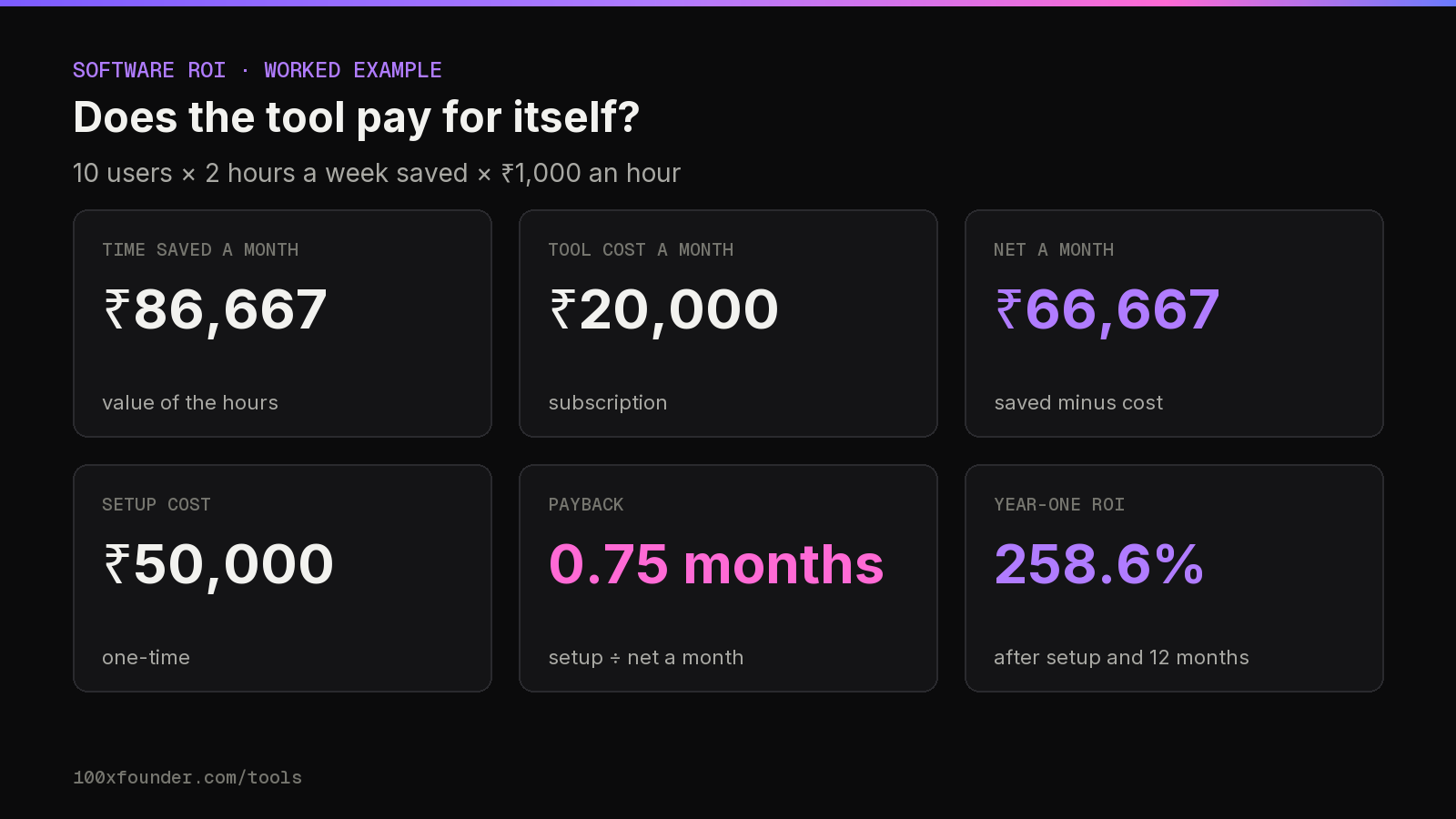
A ten-person team trials an AI assistant. Each person saves 2 hours a week, an hour of their time costs the business ₹1,000, everyone uses it, licences cost ₹2,000 per user a month and setup (training, integration, a policy review) costs ₹50,000 once.
| Line | Working | Result |
|---|---|---|
| Time saved a month | 10 × 100% × 2 × 52 ÷ 12 | 86.7 hours |
| Value a month | 86.7 × ₹1,000 | ₹86,667 |
| Cost a month | 10 × ₹2,000 | ₹20,000 |
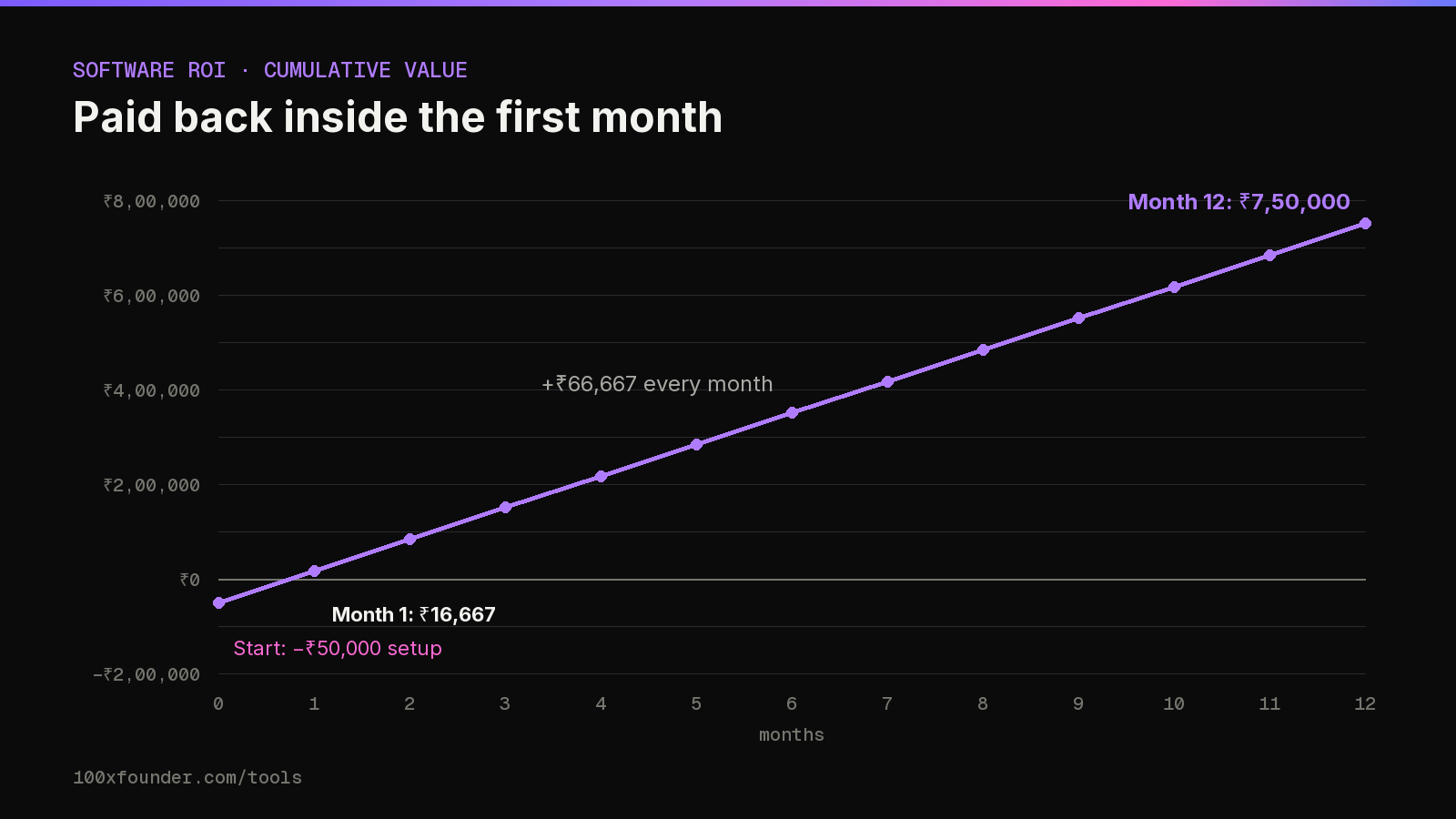
| Net a month | ₹86,667 − ₹20,000 | ₹66,667 |
| First-year cost | ₹20,000 × 12 + ₹50,000 | ₹2,90,000 |
| First-year ROI | (₹10,40,000 − ₹2,90,000) ÷ ₹2,90,000 | 258.6% |
| Payback period | ₹50,000 ÷ ₹66,667 | 0.75 months |
How sensitive the result is
That 258.6% from the AI ROI calculator looks decisive, but it rests on two guesses: that everyone uses the tool, and that each person really saves two hours a week. Change either and the answer moves a lot. Keeping licences, setup and hourly cost the same:
| Scenario | Value a month | Net a month | First-year ROI | Payback |
|---|---|---|---|---|
| 2 h a week, 100% adoption | ₹86,667 | ₹66,667 | 258.6% | 0.75 months |
| 2 h a week, 50% adoption | ₹43,333 | ₹23,333 | 79.3% | 2.1 months |
| 1 h a week, 100% adoption | ₹43,333 | ₹23,333 | 79.3% | 2.1 months |
| 0.5 h a week, 50% adoption | ₹10,833 | −₹9,167 | −55.2% | none |
Notice that the licence cost doesn't change between rows: you pay for ten seats whether two people use the tool or ten. That is why low adoption hurts seat-based tools so much, and why a small paid pilot followed by a wider rollout usually beats buying for everyone on day one.
Halving adoption and halving time saved have the same effect, because the value scales with both. In the last row the tool loses money every month, so it never pays back the setup cost. That is the case to rule out before you buy seats for a whole team.
How to measure AI ROI honestly
Any AI ROI calculator is only as good as its inputs, and the inputs that matter most are the ones people guess. A few ways to get them right:
Time saved: measure, don't ask
People are poor judges of their own speed-up. In a randomised study published in July 2025 by METR, 16 experienced open-source developers took 19% longer to finish tasks when they were allowed AI tools, yet afterwards still believed the tools had made them about 20% faster. (METR notes those results are now dated and has published newer data.) Other studies point the other way: an NBER working paper by Brynjolfsson, Li and Raymond found that a generative AI assistant raised customer support agents' issues resolved per hour by about 14% on average, and by 34% for novice and low-skilled agents, with little effect on the most experienced. The lesson for your inputs is to time real tasks before and during a pilot rather than rely on impressions.
For a sense of scale, a survey analysed by the Federal Reserve Bank of St. Louis (February 2025) found that workers who used generative AI saved an average of 5.4% of their work hours, about 2.2 hours a week for someone on a 40-hour week; across all workers, including non-users, the saving was 1.4%.
Loaded hourly cost
Use what an hour costs the business, not take-home pay. A simple way: annual cost to employ the person (CTC plus any employer costs outside it) divided by the hours they work in a year. If you assume 40 hours a week for 50 weeks, that is 2,000 hours, so a ₹20 lakh CTC works out to ₹1,000 an hour. Use your own working hours; the assumption is yours, not a rule.
Adoption
Count the people who will use the tool every week, not the people who have a login. Check usage reports from the vendor after the first month and update the input.
Time saved is not cash saved
The value line assumes saved hours go into other useful work. Unless you hire fewer people, cut overtime or ship more, the saving doesn't show up in the accounts. A Danish study by Humlum and Vestergaard (NBER, revised March 2026) found no measurable effect of AI chatbots on workers' earnings or recorded hours two years after ChatGPT's launch, even though workers reported benefits. Decide in advance what the saved time will be used for, and track that outcome.
Quality and errors
An AI draft that needs heavy checking can cost more time than it saves, and a mistake that reaches a customer has its own cost. Count review time inside your hours-saved figure.
AI agent, automation and chatbot ROI
As an AI agent ROI calculator or AI automation ROI calculator
Agents and automations often replace a task rather than speed up a person. Model them in the AI ROI calculator the same way: set users to the number of people whose work the agent takes over, time saved to the hours of that work it removes each week, and tool cost to what it costs per person-equivalent each month. If the agent runs on an LLM API and is billed by token, estimate that cost with the token cost calculator, divide it by the number of users, and enter it as the monthly cost per user. Put build and integration work into the setup cost.
As an AI chatbot ROI calculator
For a support chatbot, the benefit is agent time not spent on tickets the bot resolves. Example: 8 support agents, the bot saves each 5 hours a week, an hour of agent time costs ₹400, 80% of agents actually work with it, the bot costs ₹3,000 per agent a month and setup costs ₹1,50,000. That gives about 139 time saved a month worth ₹55,467, against ₹24,000 of monthly cost: a net ₹31,467 a month, 52.0% first-year ROI and payback in about 4.8 months. Customer satisfaction and escalations aren't in that number; watch them alongside it.
If you are comparing AI products to buy, browse new tools on our launches page, and for a software company's own unit economics see the SaaS metrics calculator.
Building the business case with the AI ROI calculator
Finance teams rarely reject AI tools because the idea is bad. They reject them because the case rests on a single optimistic number. The AI ROI calculator is most useful when you show three versions of the same case side by side:
- Vendor case. The time saving and adoption the vendor claims. Useful as an upper bound.
- Pilot case. What you measured with a small group over a few weeks: timed tasks, weekly active users, review time.
- Cautious case. The pilot figures cut by a margin you choose, for example half the time saved, to allow for novelty wearing off and for tasks the pilot didn't cover.
If the cautious case still pays back within the contract term, the decision is easy. If only the vendor case works, you have learned something important before signing.
Costs in rupees, prices in dollars
Many AI tools are priced in US dollars per seat or per token. Enter the rupee cost at the exchange rate you expect to pay, including any card or bank charges, and re-run the AI ROI calculator when the rate or the price changes. A tool that is marginal today can tip into a loss after a price rise or a weaker rupee.
What the calculator leaves out
The model is deliberately simple. It doesn't include the time managers spend choosing and rolling out the tool, data-protection and security reviews, the cost of switching away later, or benefits that aren't time, such as faster response to customers or fewer errors. If one of those is large for you, put a rupee figure on it and add it to the setup cost or to the monthly value by hand. Keep a note of what you added, so the next review uses the same rules.
When to stop
Agree a review date and a threshold before the pilot starts: for example, cancel if weekly active users are under half the seats after two months. Writing it down in advance keeps the decision about the numbers, not about how much effort went into the rollout.
Tips and common mistakes
Tips
- Run a pilot with a small group, measure time saved and adoption, then scale the inputs.
- Set a break-even test before buying: the hours a week each user must save for the net to be zero. With the example licence of ₹2,000 a month at ₹1,000 an hour and full adoption, that is under half an hour a week.
- Re-run the AI ROI calculator after three months with real usage numbers.
- Include training time in the setup cost; adoption depends on it.
Common mistakes
- Counting every seat as a user. Licences you pay for but nobody uses cut ROI directly.
- Using salary instead of loaded cost, or the other way round, without saying which.
- Counting time saved as cash when headcount and output don't change.
- Ignoring review time and the cost of errors.
- Forgetting price changes. Per-user and per-token prices move; recheck at renewal.
FAQ
How do you calculate AI ROI?
Value the time the tool saves at your loaded hourly cost, subtract what the tool costs, and compare the yearly gain with the yearly cost including setup. This AI ROI calculator does that and adds a payback period.
How to measure AI ROI in a pilot?
Time the same tasks before and during the pilot, track weekly active users from the vendor's usage reports, and note review time and errors. Use those measured figures as inputs instead of estimates.
What is a good ROI for an AI tool?
There is no standard figure, and an AI ROI calculator can't give you one. A tool with a positive monthly net and a payback shorter than your contract term is usually worth a closer look; test how the result holds up if time saved or adoption are halved.
Can I use it as an AI agent ROI calculator?
Yes. Set users to the number of people whose work the agent takes over, time saved to the work it removes each week, and the monthly cost per user to the agent's running cost divided by those users.
Does saving time mean saving money?
Only if the time is used for other valuable work, or costs fall. Otherwise the value line is a capacity gain, not a cash saving.
Why does the calculator charge licences for users who don't adopt the tool?
Because seat-based tools usually bill every seat you buy. If you only pay for active users, set users to the active number and adoption to 100%.
Does it work in dollars or other currencies?
Yes. The maths is the same in any currency, as long as the hourly cost, licence price and setup cost are all in the same one. Convert dollar-priced tools at the rate you actually pay.
Should I include the time people spend checking AI output?
Yes. Enter time saved net of review and correction. If an assistant saves three hours of drafting but adds one hour of checking, enter two hours.
What is the payback period?
The number of months of net benefit needed to recover the one-off setup cost. If the monthly net is zero or negative, there is no payback period.
Sources
- Federal Reserve Bank of St. Louis, “The Impact of Generative AI on Work Productivity”, 2025-02-27
- NBER, “Generative AI at Work (Brynjolfsson, Li, Raymond), Working Paper 31161”, 2023-11
- METR, “Measuring the Impact of Early-2025 AI on Experienced Open-Source Developer Productivity”, 2025-07-10
- NBER, “Still Waters, Rapid Currents: Early Labor Market Transformation under Generative AI (Humlum, Vestergaard), Working Paper 33777”, 2026-03
- Anthropic, “Pricing (Claude API documentation)”, 2026-10-20
- OpenAI, “API pricing”, 2026-10-20
Estimate only, not tax or legal advice. Slabs, the ₹75,000 / ₹50,000 standard deduction, the Section 87A rebate (up to ₹12 lakh taxable income in the new regime, ₹5 lakh in the old) with marginal relief, surcharge with marginal relief and the 4% cess follow the Income-tax Act, 2025 for tax year 2026-27 (rates unchanged by the Finance Act, 2026); the PF cap uses the ₹25,000 wage ceiling in force from 17 September 2026. Your payslip may differ (allowances, perks, state professional tax rules). Confirm your tax with a qualified professional or on incometax.gov.in.