Best AI tools for YouTubers in India: scripts, edits and dubbing
ChatGPT, Gemini, YouTube Studio, Premiere, Descript, Canva, OpusClip and ElevenLabs: AI tools for YouTube scripts, editing, thumbnails, captions and dubbing.
 Ishaan Vardhan20 Nov 2026 · 11 min read
The best AI tools for YouTubers in India start with the free ones inside YouTube Studio: automatic captions in Hindi and eight other Indian languages, auto dubbing between English and Hindi, and A/B tests for titles and thumbnails. Add ChatGPT or Gemini for scripts, Adobe Premiere’s free phone app or Descript for editing, Canva for thumbnails and OpusClip for Shorts, and you have a full workflow for nothing, or for under ₹1,000 a month with two paid plans.
We checked every tool on 14 November 2026 on its own pricing page, help centre or App Store India listing. Rupee prices appear wherever the vendor shows one; otherwise we give the US dollar price and say so, and your card may add currency-conversion fees.
Key takeaways
- YouTube’s automatic captions support Hindi, Bengali, Gujarati, Kannada, Malayalam, Marathi, Punjabi, Tamil and Telugu, according to YouTube Help.
- YouTube auto dubbing can turn English videos into Hindi and Hindi videos into English or Bengali, for videos up to 120 minutes long.
- Adobe’s Premiere app for iPhone is free without watermarks or ads; its paid plan is listed at ₹799 a month or ₹6,900 a year in India.
- YouTube began phasing out the Inspiration tab in August 2026 and points creators to Ask Studio instead.
- CapCut, a popular editor elsewhere, was among the apps India banned in 2020, so Indian creators need alternatives.
How we picked
We ranked AI tools for YouTubers by the job they do in a real upload: ideas and scripts, editing, thumbnails, Shorts, captions and dubbing. For each job we chose the tool that does it best for an Indian creator on a small budget, weighing free allowance, rupee price, Indian-language support and whether the output needs heavy fixing. Nobody paid for a place here and there are no sponsored entries.
Each tool’s website, pricing page or official app listing loaded on 14 November 2026. We left out tools we could not verify that day. For AI that generates whole video clips from text, see our separate guide to AI video generators; this article is about the tools that help you make your own videos faster.
AI tools for YouTubers compared
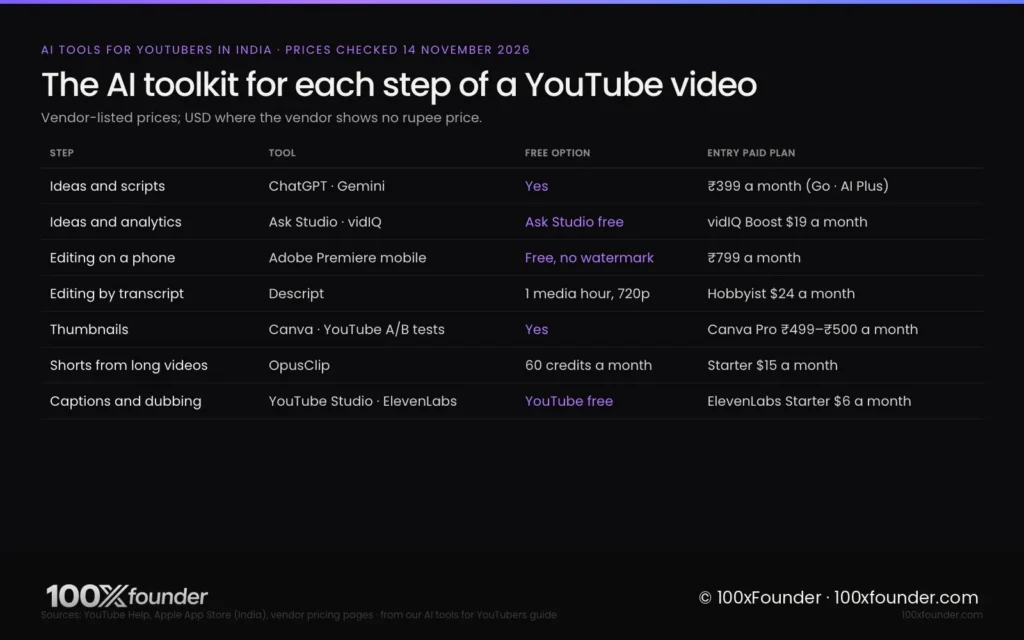
AI tools for YouTube creators in India cost anywhere from nothing, for YouTube Studio’s built-in features, to about $49 a month for a top analytics plan. The table lists each tool by the step it handles, with its free option and entry paid price.
AI tools for YouTube creators in India. Prices from each vendor’s pricing page or Apple App Store (India) listing, checked 14 November 2026; USD where no rupee price is shown.
| Step | Tool | Free option | Entry paid price |
|---|---|---|---|
| Ideas and scripts | ChatGPT, Gemini | Yes | ChatGPT Go ₹399 a month; Google AI Plus ₹399 a month |
| Ideas, titles, analytics | Ask Studio (YouTube), vidIQ | Ask Studio built in; vidIQ 150 AI credits a month | vidIQ Boost $19 a month or $199 a year (USD) |
| Editing on a phone | Adobe Premiere mobile | Free, no watermark | ₹799 a month; ₹6,900 a year |
| Editing by transcript | Descript | 1 media hour a month, 720p with watermark | Hobbyist $24 a month, or $16 a month billed yearly (USD) |
| Thumbnails | Canva, plus YouTube A/B testing | Yes | Canva Pro ₹499–₹500 a month |
| Shorts from long videos | OpusClip | 60 credits a month, watermarked | Starter $15 a month (USD) |
| Captions | YouTube automatic captions | Built in | None |
| Dubbing and voice | YouTube auto dubbing, ElevenLabs | YouTube built in; ElevenLabs 10,000 credits a month | ElevenLabs Starter $6 a month (USD) |
Free AI already inside YouTube Studio
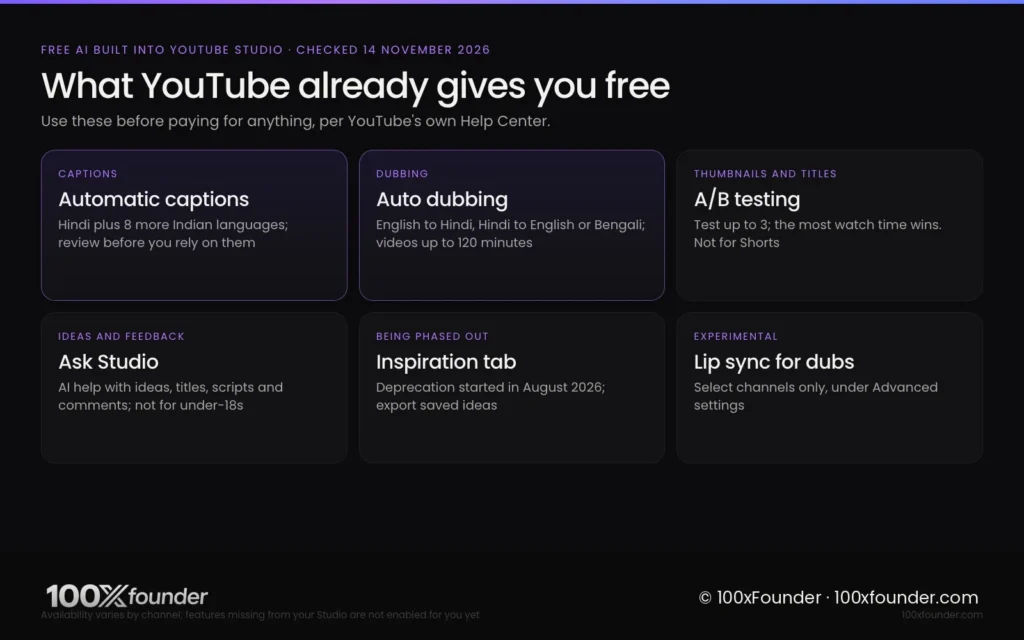
YouTube Studio already includes AI captions, auto dubbing, title and thumbnail testing and an AI assistant, and YouTube’s help pages list no charge for any of them. Use these before you pay for a third-party tool.
Automatic captions. According to YouTube Help, automatic captions work for long videos and Shorts in Hindi, Bengali, Gujarati, Kannada, Malayalam, Marathi, Punjabi, Tamil and Telugu. YouTube warns that accents, dialects and background noise cause errors, so open Subtitles in Studio and correct names and numbers before you rely on them.
Auto dubbing. YouTube’s auto dubbing help page says English videos can be dubbed into Hindi, and Hindi videos into Bengali or English. Videos longer than 120 minutes, with little speech, very fast speech or copyright claims may not qualify. You can switch to manual publishing to review every dub first, and an experimental lip-sync option is open to select channels.
A/B testing. YouTube’s A/B testing feature compares up to three titles and thumbnails and shows everyone the one with the most watch time. It needs advanced features turned on, runs only on a computer, and does not work for Shorts.
Ask Studio. Ask Studio is an AI assistant in YouTube Studio that helps with video ideas, titles, thumbnails, comment summaries and feedback on scripts, according to YouTube Help. It is not available to creators under 18 or to Made for Kids channels. YouTube started phasing out the older Inspiration tab in August 2026, so export any ideas you saved there through Google Takeout.
Best for ideas and scripts: ChatGPT, Gemini and vidIQ
ChatGPT and Gemini are the best AI tools for drafting YouTube scripts in India, and vidIQ is the best add-on when you want ideas grounded in YouTube search data. Both chat assistants have free plans; the App Store in India lists ChatGPT Go at ₹399 a month and Google AI Plus at ₹399 a month.
Use them for structure, not for facts: ask for a hook, a three-part outline and a call to action, then rewrite in your own voice and check every claim. If you were on the free year of ChatGPT Go, our guide to the end of the ChatGPT Go free year explains the renewal charge. For longer written drafts, our list of AI writing tools compares more options.
vidIQ adds keyword research, idea suggestions, an AI coach and title, description and thumbnail feedback, according to its App Store India listing. vidIQ’s pricing page lists a free plan with 150 AI credits a month, Boost at $19 a month or $199 a year with 2,000 credits and thumbnail generation, and MAX at $49 a month with 6,000 credits. The App Store in India shows several rupee price points for Boost, so check what your account is offered.
Best for editing: Adobe Premiere mobile and Descript
Adobe Premiere’s free iPhone app is the best AI video editor for Indian creators who shoot and cut on a phone, and Descript is the best choice for talking-head videos you want to edit like a document. Both handle captions and clean-up with AI.
The Premiere App Store India listing describes AI auto captions, AI audio enhancement, one-tap background removal, background expansion and generated sound effects, with no pop-up ads or watermarks. The listing also shows paid Premiere Mobile plans at ₹799 a month or ₹6,900 a year, and its generators use Adobe Firefly and third-party models.
Descript lets you edit video by editing its transcript, and according to Descript’s pricing page the free plan gives one media hour a month with 720p, watermarked exports. Hobbyist costs $24 a month, or $16 a month billed yearly, for 10 media hours, watermark-free 1080p export, Studio Sound and filler-word removal. Creator costs $35 a month, or $24 billed yearly, for 30 hours and 4K. Descript’s captions are unlimited on every plan, and dubbing into 30 languages is limited on Free.
A note for creators coming from other markets: CapCut, ByteDance’s editing app, was among the apps India banned in July 2020, Inc42 reported, citing The Economic Times.
Best for thumbnails: Canva with YouTube’s A/B tests
Canva is the best AI thumbnail tool for most Indian YouTubers, because it combines YouTube templates, background removal and text-to-image generation in an app that works in Hindi and 11 other Indian languages. Its Google Play listing lists designs for YouTube alongside the background remover, object eraser and AI image generator.
The Canva App Store India listing shows Canva Pro at ₹499 to ₹500 a month or ₹3,999 to ₹4,000 a year. Make two or three versions with different faces, words and colours, then let YouTube’s A/B test pick the winner by watch time. Avoid misleading thumbnails: a picture that promises something the video does not deliver can cost you watch time, which is the very thing the test measures.
Best for Shorts: OpusClip
OpusClip is the best AI tool for turning long YouTube videos into Shorts, because it finds clips, reframes them to vertical and adds animated captions automatically. According to OpusClip’s pricing page, the free plan gives 60 credits a month with watermarked exports that expire after three days.
Starter costs $15 a month, billed monthly only, with 150 credits, watermark-free exports, a virality score, multi-language transcription and posting to YouTube Shorts. Pro costs $29 a month and adds 16:9 and 1:1 formats, AI B-roll, video dubbing and a team workspace. Review every clip before posting: an automatic cut can drop the context that made a moment work.
Best for dubbing and voice: YouTube auto dubbing and ElevenLabs
YouTube’s built-in auto dubbing is the best free way to reach Hindi or English viewers, and ElevenLabs is the best paid option when you need more languages or your own cloned voice. Start with YouTube’s dubs, since they cost nothing and sit on the same video as extra audio tracks.
ElevenLabs says its Dubbing Studio supports more than 90 languages and accents, names Hindi among them, and clones the original speaker’s voice for each dub. ElevenLabs’ pricing page lists a free plan with 10,000 credits a month, Starter at $6 a month with 30,000 credits and a commercial licence, Creator at $22 a month with 121,000 credits and professional voice cloning, and Pro at $99 a month. Clone only your own voice or one you have written permission to use. Our guide to AI text-to-speech tools compares ElevenLabs with Google and Azure voices.
A low-cost AI stack for Indian YouTubers
A complete AI workflow for an Indian YouTuber can cost nothing: Gemini or ChatGPT’s free plan for scripts, Premiere’s free app for editing, Canva’s free plan for thumbnails, and YouTube Studio’s free captions, dubbing and A/B tests.
- ₹0 a month: free plans of Gemini or ChatGPT, Premiere mobile, Canva and OpusClip, plus YouTube Studio’s built-in tools.
- About ₹900 a month: add ChatGPT Go or Google AI Plus at ₹399 and Canva Pro at ₹499 to ₹500 for brand kits and premium templates.
- About ₹1,700 a month: add Premiere’s ₹799 plan if the free app runs short.
- Dollar-priced extras: Descript, vidIQ, OpusClip and ElevenLabs only when one of them saves you hours every week.
Be open with viewers about AI-generated voices and realistic synthetic scenes, and never use another person’s face or voice without consent.
FAQ
Which free AI tool is best for YouTube captions in Hindi?
YouTube’s own automatic captions are the best free option, since YouTube Help lists Hindi plus Bengali, Gujarati, Kannada, Malayalam, Marathi, Punjabi, Tamil and Telugu for both long videos and Shorts. Review and correct them in YouTube Studio under Subtitles, because accents and background noise cause errors. Adobe Premiere’s free app and Descript also generate captions inside the editor.
Can YouTube dub my Hindi video into English automatically?
Yes, if your channel has access. YouTube’s auto dubbing help page says Hindi videos can be dubbed into English and Bengali, and English videos into Hindi. Videos over 120 minutes, with little or very fast speech, or with copyright claims may not qualify. Turn on manual publishing in the Studio app if you want to review each dub before it goes live.
What can I use instead of CapCut in India?
CapCut was among the apps India banned in 2020, Inc42 reported. Adobe Premiere’s free iPhone app is a strong replacement, offering AI captions, background removal and audio enhancement without watermarks or ads, with a paid plan at ₹799 a month. Descript suits talking-head videos, and Canva handles quick edits alongside thumbnails.
Is vidIQ worth paying for a small YouTube channel?
vidIQ’s free plan, with 150 AI credits a month, is enough to test its idea and keyword tools. Pay for Boost, at $19 a month or $199 a year on vidIQ’s site, only once you publish regularly and want more research and thumbnail generation. Try YouTube’s free Ask Studio first if your channel has access to it.
Which AI tool should I use to make YouTube Shorts from long videos?
OpusClip is built for this job. It finds clips in a long video, reframes them to vertical and adds captions. The free plan gives 60 credits a month with watermarked exports, and Starter costs $15 a month for 150 credits and watermark-free exports. Always review each clip so it keeps enough context to make sense on its own.
Sources
- YouTube Help, “Use automatic captioning”, checked 14 November 2026. Link
- YouTube Help, “Automatic dubbing”, checked 14 November 2026. Link
- YouTube Help, “A/B test titles & thumbnails”, checked 14 November 2026. Link
- YouTube Help, “Learn about Ask Studio in YouTube Studio”, checked 14 November 2026. Link
- YouTube Help, “Explore Inspiration tab on YouTube”, checked 14 November 2026. Link
- YouTube Official Blog, “YouTube Studio updates at Made on YouTube 2025”, 16 September 2025. Link
- Apple App Store (India), “ChatGPT”, OpenAI, checked 14 November 2026. Link
- Apple App Store (India), “Google Gemini”, checked 14 November 2026. Link
- Apple App Store (India), “vidIQ for YouTube & Instagram”, vidIQ Inc, checked 14 November 2026. Link
- vidIQ, “Pricing”, checked 14 November 2026. Link
- Apple App Store (India), “Adobe Premiere AI Video Editor”, Adobe Inc, checked 14 November 2026. Link
- Descript, “Pricing”, checked 14 November 2026. Link
- Google Play (India), “Photo & Video Editor – Canva”, updated 11 November 2026, checked 14 November 2026. Link
- Apple App Store (India), “Canva”, Canva Pty Ltd, checked 14 November 2026. Link
- OpusClip, “Pricing”, checked 14 November 2026. Link
- ElevenLabs, “Dubbing Studio”, checked 14 November 2026. Link
- ElevenLabs, “Pricing”, checked 14 November 2026. Link
- Inc42, “Xiaomi Browser, ByteDance’s CapCut among 47 Chinese apps banned by India last week”, 5 August 2020. Link
Related stories

Sources (18)
- YouTube Help 14 Nov 2026Automatic captions in Hindi, Bengali, Gujarati, Kannada, Malayalam, Marathi, Punjabi, Tamil, Telugu for long-form and Shorts; accuracy caveats; edit under Subtitles
- YouTube Help 14 Nov 2026Auto dubbing English to Hindi, Hindi to Bengali/English; ineligible over 120 minutes, little/fast speech, copyright claims; manual publishing; experimental lip sync for select channels
- YouTube Help 14 Nov 2026A/B test up to 3 titles and thumbnails; most watch time wins; desktop only; advanced features needed; not Shorts
- YouTube Help 14 Nov 2026Ask Studio: ideas, titles, thumbnails, comment summaries, script feedback; not for under-18 creators, Made for Kids channels
- YouTube Help 14 Nov 2026Inspiration tab phasing out from August 2026; use Ask Studio; export saved ideas via Google Takeout
- YouTube Official Blog 16 Sep 2025Ask Studio, title A/B testing, lip-sync dubbing announced at Made on YouTube 2025
- Apple App Store (India) / OpenAI 14 Nov 2026ChatGPT Go Rs 399 a month
- Apple App Store (India) / Google 14 Nov 2026Google AI Plus Rs 399 a month
- Apple App Store (India) / vidIQ 14 Nov 2026AI coach, ideas, keyword research, title/description/thumbnail feedback; multiple INR Boost price points
- vidIQ 14 Nov 2026Free 150 AI credits/month; Boost $19/mo or $199/yr, 2,000 credits, thumbnail generation; MAX $49/mo, 6,000 credits
- Apple App Store (India) / Adobe 14 Nov 2026Free, no ads or watermarks; auto captions, AI enhance audio, background removal, background expansion, sound effects; Rs 799 monthly, Rs 6,900 yearly
- Descript 14 Nov 2026Free 1 media hour, 720p watermark; Hobbyist $24 monthly / $16 annual, 10 hours; Creator $35 / $24, 30 hours, 4K; captions unlimited; dubbing 30 languages limited on Free
- Google Play (India) / Canva 14 Nov 2026YouTube designs, background remover, object eraser, AI image generator; app in Hindi and 11 other Indian languages
- Apple App Store (India) / Canva 14 Nov 2026Canva Pro Rs 499-500 monthly, Rs 3,999-4,000 yearly
- OpusClip 14 Nov 2026Free 60 credits/month, watermark, 3-day exports; Starter $15 monthly-only, 150 credits; Pro $29 with 16:9/1:1, AI B-roll, dubbing, team workspace
- ElevenLabs 14 Nov 2026Dubbing in 90+ languages and accents, Hindi listed, clones original speaker voice
- ElevenLabs 14 Nov 2026Free 10k credits; Starter $6/mo 30k credits, commercial licence; Creator $22/mo 121k, professional voice cloning; Pro $99/mo
- Inc42 5 Aug 2020CapCut among apps banned by India in July 2020, citing Economic Times