Best AI tools for Excel and Google Sheets (2026): prices in India
Copilot, Gemini in Sheets, Claude for Excel, ChatGPT, GPTExcel, Better Analyst and Rows compared: free plans, rupee prices and which to use for what.
 Ishaan Vardhan21 Nov 2026 · 11 min read

The best AI tool for Excel in 2026 is Microsoft Copilot, built into Excel with a Microsoft 365 Personal plan from ₹689 a month in India, while Google Sheets users get Gemini’s side panel and the =AI() function on an eligible Google plan. Claude for Excel and ChatGPT’s spreadsheet extensions are the strongest add-ins for checking and building models, and GPTExcel, Better Analyst and Rows cover formulas, quick analysis and AI-first spreadsheets.
We checked seven tools on 14 November 2026 on each vendor’s own pricing and help pages, plus the rupee prices listed on the Apple App Store for India. Prices change often and taxes may apply, so confirm the final amount on the checkout screen.
Key takeaways
- Microsoft 365 Personal costs ₹689 a month or ₹6,899 a year in India and includes Copilot in Excel, according to Microsoft’s India Copilot page on 14 November 2026.
- Gemini in Google Sheets needs an eligible Google Workspace or Google AI plan; Google’s help page says free personal accounts don’t qualify.
- Claude for Excel works on Claude Pro and higher plans, and Claude Pro is listed at ₹1,999 a month on the App Store in India.
- Formula Bot is now called Better Analyst, according to the company’s pricing page; its Pro plan costs $30 a month.
How we picked
We ranked these AI tools for Excel and Google Sheets on four things: how deeply each tool works inside the spreadsheet, what it costs an Indian user, what the free plan allows, and how well it fits finance and analyst work. Each tool’s site and pricing page loaded when we checked on 14 November 2026. No vendor paid to be included and nothing here is sponsored.
We dropped two tools we planned to cover. Julius AI’s pricing page blocked our automated check, and Numerous.ai’s pricing page didn’t show readable plan prices, so we couldn’t confirm either price on the vendor’s own page that day. If you work in accounts, our guides to AI tools for chartered accountants in India and AI accounting and bookkeeping tools go deeper on GST, audit and bookkeeping software.
AI tools for Excel and Google Sheets compared
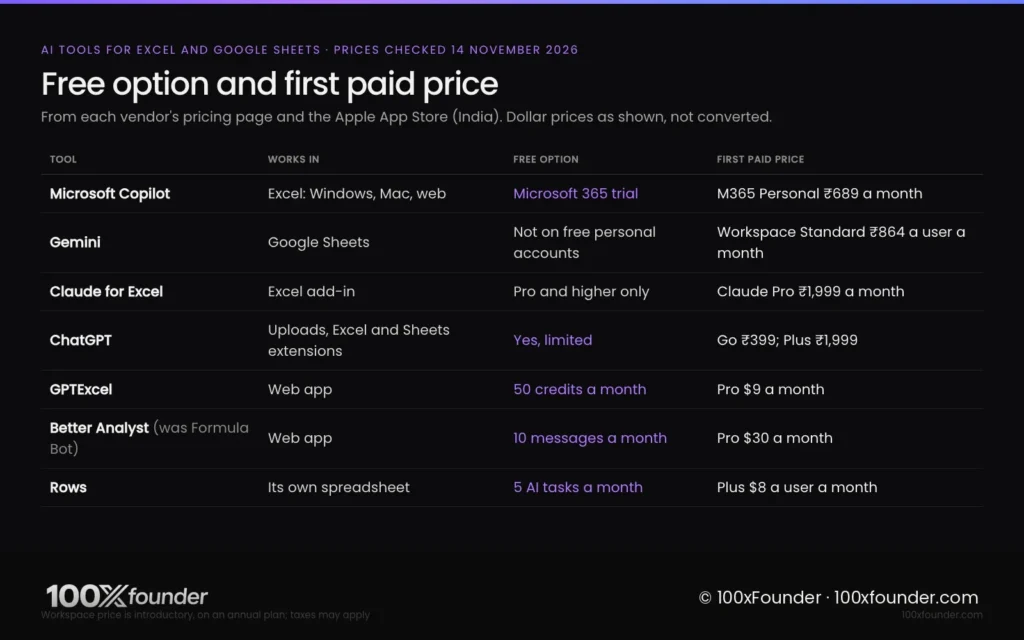
AI tools for Excel and Google Sheets range from free formula generators to Microsoft and Google plans that put an assistant inside every workbook. The table below lists each tool’s main job, its free option and its first paid price as each vendor shows it.
AI tools for Excel and Google Sheets. Prices from each vendor’s pricing page and the Apple App Store (India), checked 14 November 2026. Rupee prices are shown where the vendor lists them; other prices are in US dollars as shown, without conversion.
| Tool | Works in | Best for | Free option | First paid price |
|---|---|---|---|---|
| Microsoft Copilot in Excel | Excel on Windows, Mac and the web | Editing workbooks, PivotTables, charts | Microsoft 365 trial | Microsoft 365 Personal ₹689 a month or ₹6,899 a year |
| Gemini in Google Sheets | Google Sheets | =AI() on ranges, tables, formulas | Not on free personal accounts | Workspace Standard ₹864 a user a month (introductory, annual plan) |
| Claude for Excel | Excel add-in (web, Windows, Mac) | Checking and building financial models | No; Pro and higher plans only | Claude Pro ₹1,999 a month (App Store India) |
| ChatGPT | Chat uploads; Excel and Google Sheets extensions | Analysing exported data, explanations | Yes, limited | Go ₹399; Plus ₹1,999 (App Store India) |
| GPTExcel | Web app | Formulas, VBA, Apps Script, SQL | 50 credits a month | Pro $9 a month |
| Better Analyst (formerly Formula Bot) | Web app | Chat-based analysis and dashboards | 10 chat messages a month | Pro $30 a month |
| Rows | Its own spreadsheet | AI Analyst, live data imports | 5 AI tasks a month | Plus $8 a user a month ($6 billed annually) |
Best overall for Excel: Microsoft Copilot
Microsoft Copilot is the best AI tool for Excel users because it edits the workbook directly with Excel’s own tables, charts, PivotTables and formulas. Microsoft’s support page says Copilot in Excel can work in an Edit mode that makes changes, a Plan mode that proposes steps first, and a Chat-only mode that analyses without touching the file.
In India, Microsoft 365 Personal costs ₹689 a month or ₹6,899 a year, Microsoft 365 Family costs ₹819 a month or ₹8,199 a year, and Microsoft 365 Premium costs ₹1,999 a month or ₹19,999 a year, according to Microsoft’s India Copilot page checked on 14 November 2026. The same page says Copilot features on the Family plan are for the subscription owner only, not the other members. Microsoft’s footnote says Copilot in Excel needs AutoSave turned on, which means the file has to live in OneDrive.
Copilot’s edit, chat and plan modes run on Excel for Windows, Mac and the web, while the Android app offers chat only, according to Microsoft’s support page.
Best for Google Sheets: Gemini
Gemini in Google Sheets is the best choice for teams that live in Google Workspace, because it adds an “Ask Gemini” side panel and a built-in =AI() function to every sheet. Google’s help page says the side panel can create tables and formulas, fix formula errors, build charts, and run actions such as pivot tables, conditional formatting and filters.
The =AI() function takes a prompt and an optional range, and can summarise text, sort entries into categories, judge sentiment and pull current information from Google Search, according to Google’s help page. Google says the function sees only the range you give it, generates the first 350 selected cells at a time, and returns text only.
Google Workspace Business Standard, the first plan that lists Gemini in Sheets, costs ₹864 a user a month on an annual plan for the first 12 months and ₹1,080 after that, according to Google’s India pricing page on 14 November 2026. For personal accounts, Google AI Plus costs ₹399 a month and Google AI Pro ₹1,950, according to Google’s India subscriptions page, but that page names Gmail and Docs rather than Sheets, so test the feature during any trial before you pay.
Best for financial models: Claude for Excel
Claude for Excel is the best AI add-in for checking and building financial models, because its answers cite the exact cells they rely on. Anthropic’s documentation says the add-in can trace how a number is calculated, change an assumption while keeping formula links intact, and find the source of errors such as #REF! and #DIV/0!.
The add-in is available on Claude’s Pro, Max, Team and Enterprise plans, according to Anthropic’s documentation checked on 14 November 2026. Claude Pro costs $20 a month billed monthly or $17 a month billed annually on Anthropic’s pricing page, and ₹1,999 a month on the App Store in India. It runs on Excel for the web, Excel for Windows with Microsoft 365, and Excel for Mac version 16.46 or later, but not on Excel 2016, Excel 2019, iPad or Android.
Anthropic lists two limits analysts should know: the add-in can’t work with Excel data tables or run macros and VBA. Anthropic also warns that spreadsheets from outside sources can hide instructions that try to make Claude extract or change data, so it recommends using the add-in only on trusted files.
Best for quick analysis: ChatGPT
ChatGPT is the most flexible option for one-off analysis, such as uploading a sales export and asking for trends, a cleaned table or a chart. OpenAI’s pricing page lists data analysis on the Go, Plus and Pro plans, and lists Excel, Word, PowerPoint and Google Sheets extensions as limited on Free and Go and included on Plus.
ChatGPT Go costs ₹399 and ChatGPT Plus ₹1,999 on the App Store in India, checked on 14 November 2026. Our ChatGPT alternatives in India guide compares the wider chat assistants if you want one tool for both spreadsheets and writing.
Best for formulas and scripts: GPTExcel
GPTExcel is the best low-cost tool for writing and explaining formulas, because it handles Excel, Google Sheets, LibreOffice Calc and Airtable in one place. GPTExcel’s site says it also writes VBA, Google Apps Script, SQL queries and regular expressions from plain-English requests.
The free plan includes 50 credits a month and 5 free tool runs a day, with files up to 5 MB, according to GPTExcel’s pricing page on 14 November 2026. Pro costs $9 a month with about 3,000 credits, and Pro Plus costs $18 a month with about 10,000 credits and files up to 100 MB.
Best for dashboards: Better Analyst (formerly Formula Bot)
Better Analyst, the new name for Formula Bot, is a chat-based analysis tool that turns uploaded data into answers and AI dashboards. The company’s pricing page says “Formula Bot is now Better Analyst” and that existing accounts carry over.
Better Analyst’s free plan allows 10 chat messages and 100 AI credits a month with one data source, according to its pricing page checked on 14 November 2026. Pro costs $30 a month billed monthly and adds unlimited chat, unlimited data sources and 3,000 AI credits a month.
Best AI-first spreadsheet: Rows
Rows is a spreadsheet built around an AI Analyst, aimed at people who want live data from business tools without writing formulas. Rows says its AI can pull data out of PDFs and documents, build reports and models from a plain-language request, and combine live data from more than 50 sources.
Rows’ free plan includes 5 AI tasks a month, and each message to the AI Analyst counts as one task, according to its pricing page on 14 November 2026. The Plus plan costs $8 a user a month, or $6 billed annually, with 200 AI tasks.

Which AI tool to use for which spreadsheet job
The right AI tool for a spreadsheet depends on where your files live and how much the numbers matter. Our picks, based on the vendor pages above:
- Your office runs on Microsoft 365: Copilot in Excel, from ₹689 a month with Microsoft 365 Personal.
- Your team works in Google Drive: Gemini in Sheets on Workspace Business Standard or a Google AI plan that includes it.
- You audit or build financial models: Claude for Excel, for its cell-level citations.
- You need one formula or macro explained: GPTExcel’s free plan.
- You want a quick chart from an export: ChatGPT, from ₹399 on Go.
- You want live dashboards from business tools: Rows or Better Analyst.
Data safety: what to check before you upload a client file
Uploading a spreadsheet to an AI tool sends its contents to the vendor, so finance staff should check the vendor’s data terms before sharing client or payroll data. Anthropic’s documentation says that when you sign in with a Claude account, the add-in sends your conversations and the workbook content Claude reads to Anthropic, and that inputs and outputs are deleted on its servers within 30 days except in listed cases.
Google’s help page says the =AI() function can only see the range you pass to it, not the whole spreadsheet or other Drive files. For CA firms and payroll teams, a safe habit is to remove PAN, Aadhaar and bank details before asking any AI tool for help, and to follow your firm’s own data policy.
Bottom line
For most people in India the choice follows the software already on their laptop: Copilot for Microsoft 365 users and Gemini for Google Workspace teams. Add Claude for Excel if you review models for a living, and treat every AI answer as a draft until you have checked the totals. Analyst and finance roles on our jobs board increasingly ask for these skills.
FAQ
Which AI is best for Excel in India?
Microsoft Copilot is the best AI for Excel in India for most people, because it works inside Excel and can edit tables, charts and PivotTables directly. It comes with Microsoft 365 Personal at ₹689 a month or ₹6,899 a year, according to Microsoft’s India page on 14 November 2026. Copilot in Excel needs AutoSave on, so keep the file in OneDrive.
Is there a free AI tool for Excel formulas?
Yes. GPTExcel’s free plan gives 50 credits a month and 5 free tool runs a day, enough to write or explain formulas for Excel and Google Sheets, according to its pricing page checked on 14 November 2026. ChatGPT’s free plan can also explain formulas, though OpenAI lists its spreadsheet extensions as limited on the free tier. Always test a generated formula on a few rows first.
Can I use Gemini in Google Sheets with a free Gmail account?
No. Google’s help pages say Gemini in Sheets and the =AI() function need an eligible Google Workspace or Google AI plan. In India, Workspace Business Standard lists Gemini in Sheets at ₹864 a user a month on an introductory annual plan, according to Google’s pricing page on 14 November 2026. Business Starter at ₹270 does not list Gemini in Sheets.
Is Claude better than ChatGPT for Excel?
Claude for Excel suits model review better, because it answers with clickable cell-level citations and keeps formula links intact when it changes an assumption, according to Anthropic’s documentation. ChatGPT is more flexible for one-off analysis of uploaded exports. Both cost ₹1,999 a month for their main paid plan on the App Store in India, checked 14 November 2026, so try both on a copy of a real file.
Is it safe to upload client data to AI tools?
It depends on the vendor’s terms and your firm’s rules. Anthropic says the Claude add-in sends workbook content it reads to Anthropic and deletes inputs and outputs within 30 days except in listed cases. Before uploading, remove PAN, Aadhaar and bank details, use a copy of the file, and confirm your firm’s data policy. When in doubt, ask your firm’s compliance lead first.
What happened to Formula Bot?
Formula Bot has been renamed Better Analyst, according to the company’s pricing page checked on 14 November 2026, which says existing accounts carry over. The free plan allows 10 chat messages a month, and Pro costs $30 a month billed monthly. The product now centres on chat-based data analysis and AI dashboards rather than single formulas.
Sources
- Microsoft, “Microsoft Copilot for individuals” (India), checked 14 November 2026. Link
- Microsoft Support, “Copilot in Excel / Agent Mode in Excel”, checked 14 November 2026. Link
- Google, “Gemini subscriptions” (India), checked 14 November 2026. Link
- Google Workspace, “Pricing” (India), checked 14 November 2026. Link
- Google Docs Editors Help, “Use the AI function in Google Sheets”, checked 14 November 2026. Link
- Google Docs Editors Help, “Collaborate with Gemini in Google Sheets”, checked 14 November 2026. Link
- Anthropic, “Use Claude for Excel”, checked 14 November 2026. Link
- Anthropic, “Claude pricing”, checked 14 November 2026. Link
- Apple App Store (India), “Claude by Anthropic”, checked 14 November 2026. Link
- OpenAI, “ChatGPT pricing”, checked 14 November 2026. Link
- Apple App Store (India), “ChatGPT”, OpenAI, checked 14 November 2026. Link
- GPTExcel, homepage and “Pricing”, checked 14 November 2026. Link
- Better Analyst (formerly Formula Bot), “Pricing”, checked 14 November 2026. Link
- Rows, “Pricing”, checked 14 November 2026. Link
- Rows, homepage, checked 14 November 2026. Link
Related stories



Sources (15)
- Microsoft 14 Nov 2026M365 Personal ₹689/₹6,899, Family ₹819/₹8,199 (AI owner only), Premium ₹1,999/₹19,999, one-month Premium trial; Copilot in Excel needs AutoSave
- Microsoft Support 14 Nov 2026Copilot in Excel Edit/Plan/Chat modes, built-in tools, platform support (Android chat only)
- Google 14 Nov 2026Google AI Plus ₹399, AI Pro ₹1,950; Gemini in Gmail/Docs named, Sheets not named
- Google Workspace 14 Nov 2026Business Standard ₹864 intro then ₹1,080/user/month annual with Gemini in Sheets; Starter ₹270 without it
- Google 14 Nov 2026=AI() syntax, uses, 350-cell batch, text-only, range-only access, eligible plan required
- Google 14 Nov 2026Gemini in Sheets side panel features; eligible Workspace or Google AI plan required
- Anthropic 14 Nov 2026Claude for Excel plans, features, supported/unsupported versions, limits, prompt-injection warning, data handling
- Anthropic 14 Nov 2026Claude Pro $20 monthly or $17 annual
- Apple App Store (India) / Anthropic 14 Nov 2026Claude Pro ₹1,999 a month
- OpenAI 14 Nov 2026Data analysis on Go/Plus/Pro; Excel and Google Sheets extensions limited on Free/Go, included on Plus
- Apple App Store (India) / OpenAI 14 Nov 2026ChatGPT Go ₹399, Plus ₹1,999
- GPTExcel 14 Nov 2026Free 50 credits, 5 free tool runs a day, 5 MB; Pro $9; Pro Plus $18; formulas, VBA, Apps Script, SQL
- Better Analyst 14 Nov 2026Formula Bot renamed Better Analyst; Free 10 messages; Pro $30/month
- Rows 14 Nov 2026Free 5 AI tasks; Plus $8/user monthly or $6 annual with 200 AI tasks
- Rows 14 Nov 2026AI Analyst, PDF extraction, 50+ live data sources